Using the Avg. LoS view
The Avg. LoS page shows the average number of nights guests stay, split by date, room type, and segment. LoS is short for length of stay.
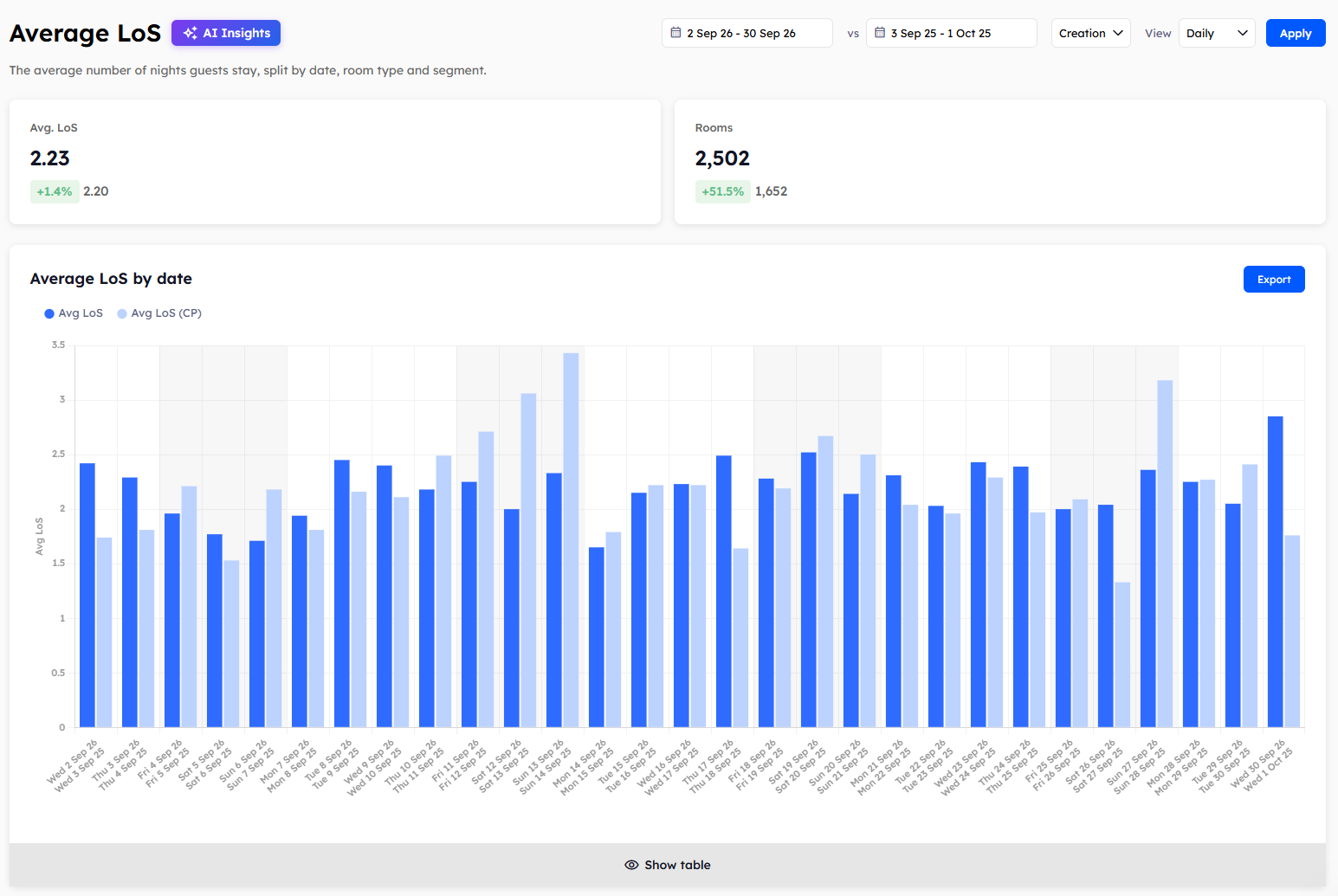
The summary cards
Two cards at the top of the page show the totals for your chosen dates.
Avg. LoS: the average number of nights guests stay.
Rooms: the number of room nights sold.
Average LoS by date
This report shows the average length of stay for each day, week, or month, depending on the View filter.
A date's figure is the average for everyone staying that night, not only the guests arriving that day. A guest on a long stay therefore raises the figure for every night they're with you.
Average LoS by day of the week
This report shows the average for each day from Monday to Sunday. In the table, Count shows how many of each weekday fall within your dates. It only appears when the View filter is set to Daily.
Average LoS by requested room type
This report shows the average for each room type. The room type is the one the guest booked, which may not be the room they were given.
Average LoS by segment
This report shows the average for each of your segment groups, with the segments from your property management system (PMS) listed beneath each one. Use it to see which guest types stay longest.
The Avg. LoS page has no Revenue filter, because it doesn't show revenue. To learn how to read the charts and tables, see Reading Explorer reports.
Was this helpful?
Still need help? Share an idea