Tracking parity with the Parity monitor
The Parity monitor tracks one specific problem: when a partner offer undercuts the rate you've set on directly.
Partner offers come from wholesalers, OTAs, and third parties whose contracts shouldn't let them publish below your direct rate — but in practice they sometimes do.
If you've ever had a guest say "I found you cheaper on another site," this is the page that tells you whether they were right.
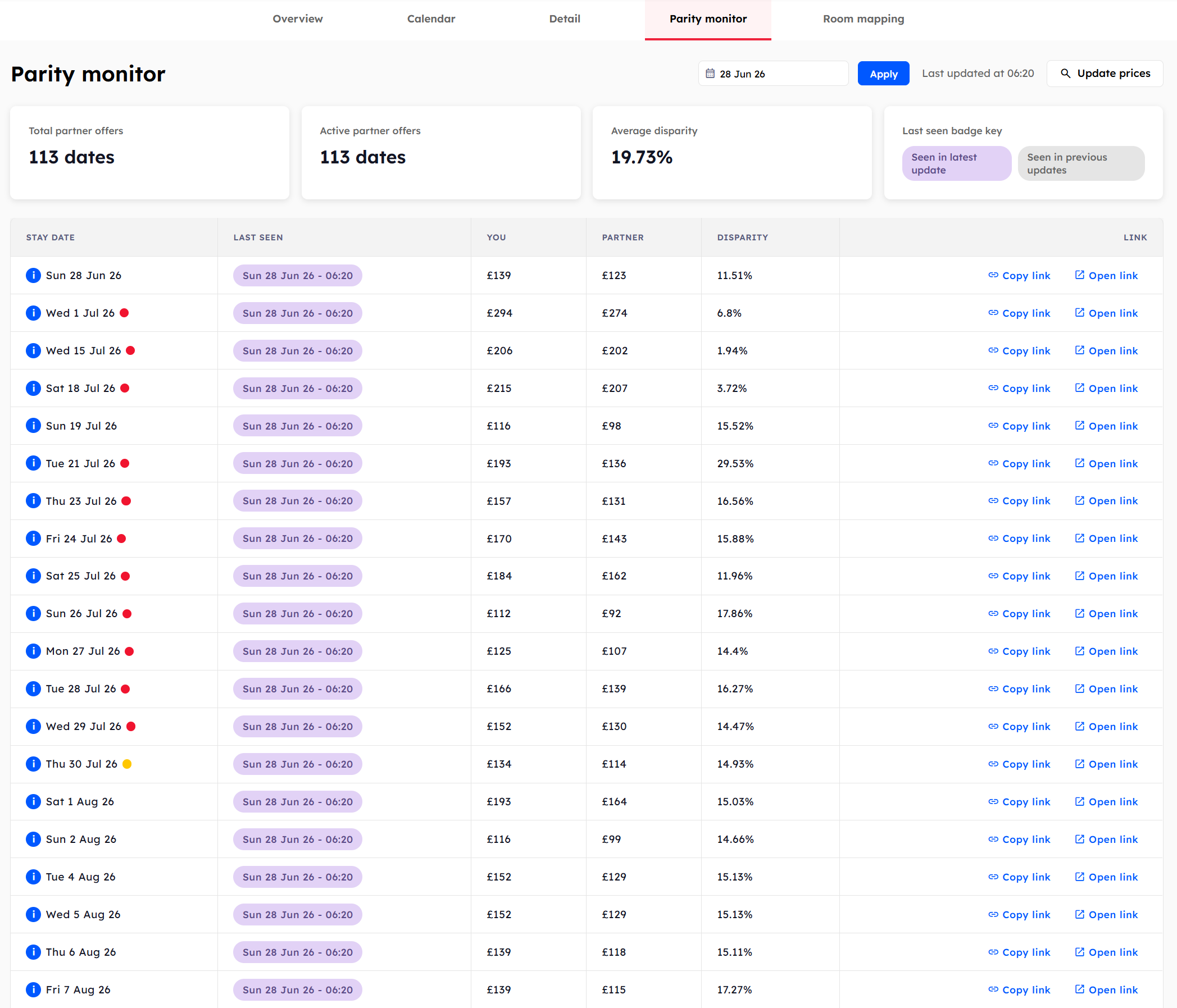
What you'll see
The page has two parts: summary cards at the top and a table below.
Summary cards
Active partner offers — the number of stay dates where at least one partner is currently undercutting your rate.
Average disparity — the average percentage gap between your rate and the cheapest partner offer, across all active dates.
A third card shows the Last seen badge key, explaining the two date badges used in the table:
Seen in latest update — the offer was confirmed during the most recent price update.
Seen in previous updates — the offer appeared in earlier updates but wasn't in the latest pull. It may have been removed.
The parity table
Each row represents one disputed stay date. The columns are:
The stay date in question.
When the partner offer was last observed, with the latest/previous badge.
Your own rate on Booking.com for the date.
The cheapest partner rate found.
The percentage gap (e.g. 10.6%).
Actions to investigate.
Investigating an offer
In the LINK column you'll see two buttons:
Copy link — copies the Booking.com search URL to your clipboard.
Open link — opens the URL in a new tab so you can verify the offer for yourself.
Once you've confirmed the disparity, follow your normal channel-management process to address it.
The parity monitor refreshes with every price update. Old disparities that resolve themselves will move from Seen in latest update to Seen in previous updates and eventually drop off the table.
Was this helpful?
Still need help? Share an idea